Using the Internals Tab
Last updated: November 18, 2026
See how a classification compares to similar roles in your own organization, and use those comparisons to check pay progression, internal equity, and opportunities to consolidate specs.
What Is the Internals Tab?
Market data tells you how a role compares to peer agencies. Just as important is how it compares to the roles you already have. Are the steps in a job series proportional? Are two departments paying differently for nearly the same work? Do you have two specs describing the same job?
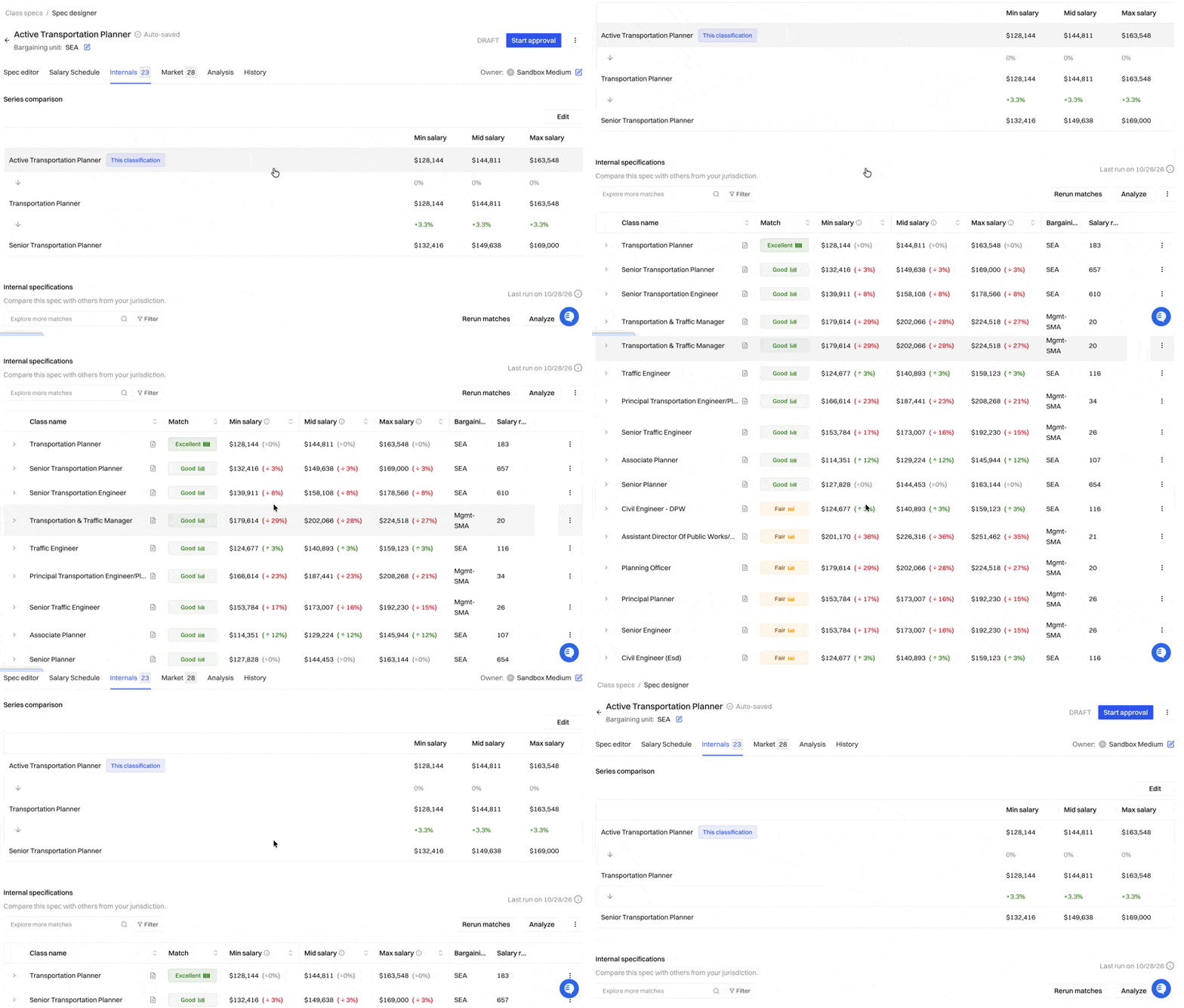
The Internals tab on every class spec answers these questions. It shows the classifications in your organization that score 60% or higher in similarity to the spec you're viewing. Holly finds these matches automatically by comparing duties, level, qualifications, and work setting, not just job titles.
Common Use Cases
Checking series and salary progression
For specs in a job series, Holly calculates the salary difference between consecutive levels. For example, how much higher the Accountant II minimum is than the Accountant I. Use this to check that your pay steps are proportional and easy to defend before a compensation study or a budget request.
Reviewing internal equity
The Internals tab shows comparable roles across departments side by side, so you can spot gaps. For example, an Administrative Analyst in Public Works may be paid well below a nearly identical role in Finance.
To go deeper, run a Qualification Standards Analysis from the Internals tab's Analyze menu. It compares this spec's minimum qualifications against your own similar classes, which helps when you're supporting a reclassification or an internal equity review. Results are saved on the spec's Analysis tab.
Finding merge candidates
Over time, agencies often end up with near-duplicate specs, such as an "Office Assistant" and a "Clerical Assistant" with almost the same duties. High-similarity internal matches make these easy to spot. When you find a pair worth consolidating, use Merge Specs to combine them. See 📄 How to Merge Class Specifications.
How to Use the Internals Tab
Open the class specification and click the Internals tab.
Review the series comparison, if the spec belongs to a job series.
Scroll to the list of similar classifications and click any match to see its details.
Use Filter above the table to narrow the list.
Run a Qualification Standards Analysis or export your matches as needed.
Next Steps
Questions about your internal matches? Reach out to support@hollygov.com.
Related Articles
📄 How Benchmarking Works in Holly: The Internals and Market tabs at a glance
📄 Qualification Standards Analysis: Compare minimum qualifications against similar classes
📄 How to Merge Class Specifications: Combine near-duplicate specs
📄 Exporting Data from the Internals and Market Tabs: Export formats and what each includes