Setting Up Approval Workflow for Santa Clara County
Last updated: July 24, 2026
Understand the specific SCC steps for setting up Holly's approval workflow once you've created a class specification you'd like to share.
What is the Approval Workflow?
For detailed information on an Approval Workflow in general, see 📄 How to Manage an Active Approval Workflow!
As a reminder, the approval workflow is Holly's built-in review and approval system. Instead of passing Word documents back and forth or trying to coordinate feedback across email threads, you can:
Set up a structured review process with multiple stages
Assign specific reviewers to each stage
Collect all feedback and comments in one place
Track who's completed their review and who still needs to
Maintain a clear version history as your specification evolves
Once all reviews are complete, you can publish the specification as the official version with confidence that everyone who needed to see it has had their say.
Click below to watch a video on setting up the workflow for Santa Clara County: Video on SCC Approval Workflow
Starting an Approval Workflow
Document owners initiate the approval workflow from a draft specification. Here's how to get started:
Navigate to Your Draft
From the main Class Specs dashboard, open the specification that you want to send through the approval workflow. The specification needs to be in "Draft" status in order to initiate the approval workflow process.
Launch the Workflow Setup
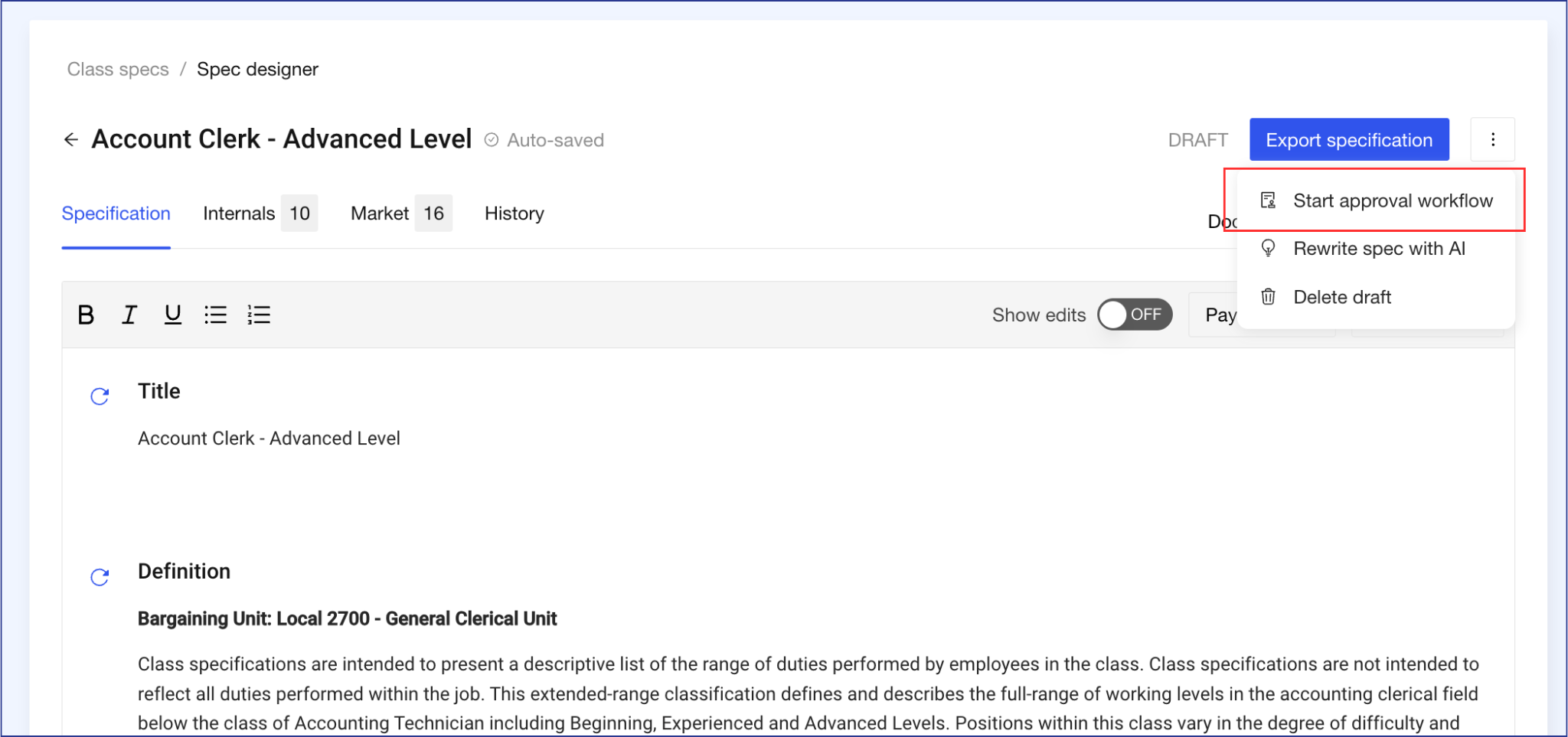
Click the three-dot menu icon in the top-right corner of the page and select "Start approval workflow." This opens the workflow configuration page.
Configure Your Review Process
The workflow configuration page allows you to build a review process tailored to your organization's needs. Here's how to set it up:
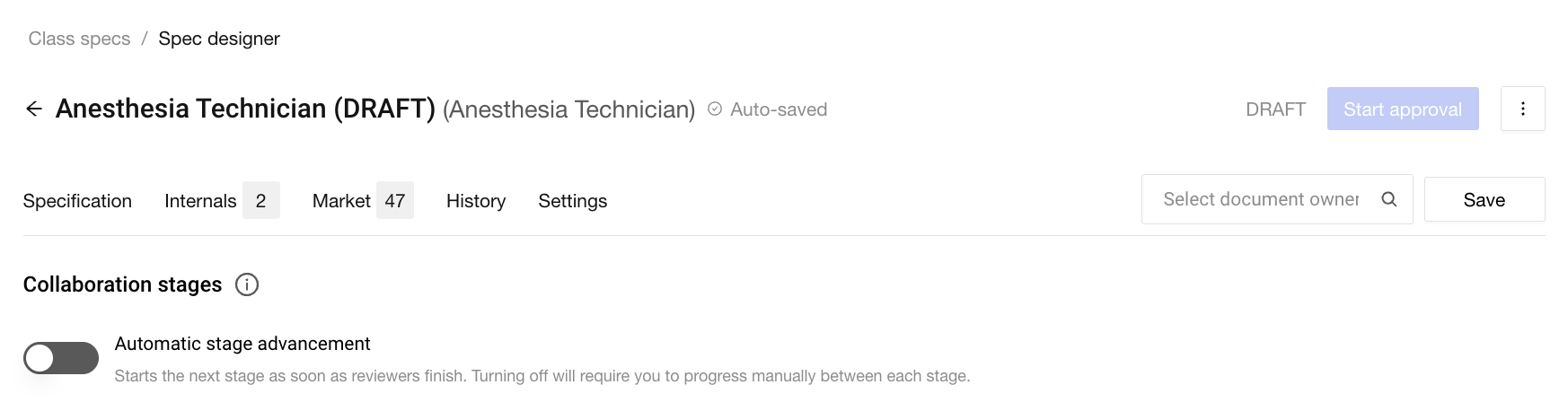
Confirm the Document Owner
In the top-right corner of the configuration page, you'll see who's assigned as the document owner (if any). You'll need a document owner designated before you can start the approval workflow. If you need to change the document owner, you can do so at this stage or at any point during the workflow.
Document Owner: The primary person responsible for a job specification. They initiate the workflow, manage reviewers, configure approval stages, accept / reject edits, and have the final authority to publish the spec.
Choose Stage Advancement Mode
Use the stage advancement toggle to decide whether the level of control that you want as the document owner over the approval process.
Automatic: When the last reviewer finishes, Holly immediately notifies the next stage's reviewers. This keeps the approval process moving along quickly.
Manual: The workflow pauses after each stage until you manually advance it, giving you time to incorporate feedback first. This may slow down the process slightly, but affords the document owner more control over how feedback and comments are incorporated into the spec.
We recommend setting the stage advancement to manual so you receive feedback after each stage.
Add Approval Stages + Steps
The approval workflow contains steps and stages.
Stages allow a review to happen specific order. For example, you want the department to review first, then HR, then executive leadership. Each stage must be completed before the next one begins.
Steps allow multiple people at the same stage need to review simultaneously. For example, three different department managers all need to weigh in, but their reviews can happen at the same time. All steps in a stage run in parallel.
Order of Santa Clara County Process
Below are the required stages to include when conducting an approval workflow within the County. You can always edit the workflow through the process to add / edit the stages.
Stage 1: HR Internal Review
Step Name: HR Internal Review
Reviewers to include:
Supervisor/Senior
HR Manager
Stage 2: HR Internal Review
Step Name: HR Internal Review
Reviewers to include:
Assistant HR Director
HR Director
Stage 3: HR Internal Review (if requested)
Step Name: HR Internal Review
Reviewers to include:
Supervisor/Senior
HR Manager
Stage 4: Posted to Department
Step Name: Posted to Department
An individual assigned to review a specification that does not have a Holly account. We typically refer to them as External Reviewers.
They can be invited to review the spec using their email to sign in via a magic link. They can add comments, suggest changes, and must mark their review as complete to advance the workflow. They are not able to see the whole timeline for the approval workflow or use any other part of the Holly platform.
Stage 5: Post Department HR Review (and repeat Stages 1-3) OR Posted to Union OR LR for unit allocation / EEOP (if new spec)
Step Name: Dependent based on class specification. Options include:
Posted Department HR Review (afterwards, repeat Stages 1-3)
Posted to Union
Posted to LR for unit allocation/EEOP (if new spec)
Stage 6: Post Union HR Review (and repeat Stages 1-3) OR On BOS Agenda/Pending Implementation
Step Name: Dependent based on class specification. Options include:
Post Union HR Review (afterwards, repeat Stages 1-3)
On BOS Agenda/Pending Implementation
After the BOS approval (second board reading), you can "publish" the class spec.
Explanation of all Santa Clara County Step Names
HR Internal Review: ESA review and approval to post to the department
Posted to Department
Post Department HR Review: Department provided feedback; if recommendations change, route for ESA approval.
Post Department HR Review
Posted to LR for unit allocation/EEOP: For new classifications only, email the HR Director for EEOP designation and request LR to determine the appropriate bargaining unit.
Posted to Union
Post Union HR Review: Union provides feedback; if recommendations change, route for ESA approval.
On BOS Agenda/Pending Implementation
On Hold: When a study is paused for any reason (FERC, Department, etc.)