How to Get Help in Holly
Last updated: November 18, 2026
Where to find answers in Holly, from searching the help center to chatting with a member of the Holly team.
Where Help Lives in Holly
Holly can do a lot, and that can feel like a lot when you're new. Help is built into every page, so you don't have to leave what you're working on to get unstuck.
Click the blue support icon in the bottom right corner of any screen. From there you can search the help center, chat with the Holly team, or jump to the Learning Academy.
Support isn't only for things that are broken. Use it when you can't find something, when you're learning a new part of the platform, or when you have feedback about how Holly works.
Using the Support Icon
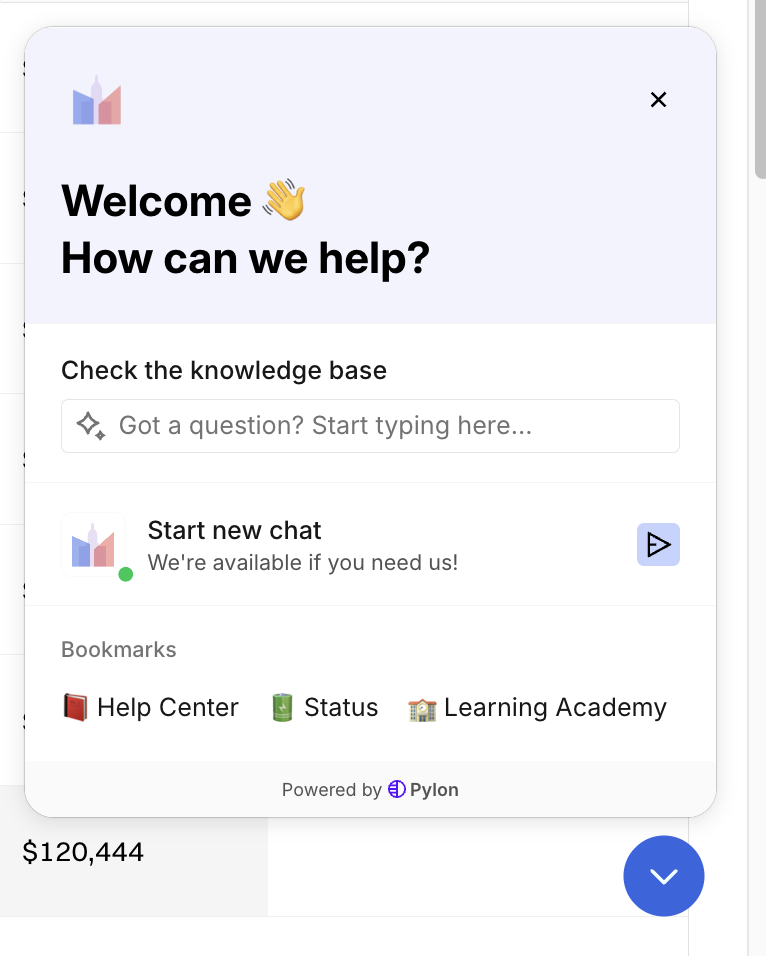
When you click the support icon, a panel opens with everything in one place:
Check the knowledge base: Type your question in the search box to find matching help articles without leaving the page.
Start new chat: Message the Holly team directly. The green dot shows the team is available.
Bookmarks: Shortcuts to the Help Center, the Status page (where you can see whether Holly is having an issue), and the Learning Academy.
How to Start a Chat
Click the blue support icon in the bottom right corner of any screen.
Click Start new chat.
Type your question and send it. A member of the Holly team will reply in the chat.
What to include
A little context helps the team answer in one reply instead of several:
A screenshot of what you're seeing. This is the single most helpful thing you can send.
The spec, report, or page you're working on, by name or link.
What you expected to happen and what happened instead.
Choosing Where to Start
Your situation | Where to start |
|---|---|
You're new to Holly and want to learn the platform | Holly Learning Academy |
You want a refresher on a workflow before you run it | Holly Learning Academy |
You want to know how a feature works or how to complete a task | Search the knowledge base from the support icon |
Holly seems slow or isn't loading | Check the Status page, then start a chat |
You can't find what you're looking for, or something isn't working as expected | Start a chat |
Your question is specific to your agency's data, comparators, or setup | Start a chat |
You want to talk it through live | Ask for a call in chat |
You have feedback, a longer question, or documents to send | Email Holly Support at support@hollygov.com |
Training in the Holly Learning Academy
The knowledge base answers a specific question. The Holly Learning Academy teaches you the platform, with short video courses that walk through each part of Holly in order. Open it from Bookmarks in the support panel, or go to learn.hollygov.com.
Start there when:
You're new to Holly. Get oriented on your own time, so your live time with the Holly team can go to questions that are unique to your work.
You need a refresher. Come back when you're picking up a workflow you haven't used in a while, running something for the first time on real data, or getting back up to speed after onboarding.
Emailing Holly Support
You can always reach the team at support@hollygov.com from your own email, whether it's a question, feedback, or a thought about the product. The team responds by email.
Next Steps
If you can't get into Holly at all, start with 📄 How to Log In to Holly. For quick answers to the questions we hear most, see 📄 Holly FAQs.