Understanding Holly's Similarity Matches (Similarity Matching 2.0)
Last updated: October 8, 2026
Learn how Holly finds and rates comparable classifications, how to read a match, and what has changed in our latest update.
How Holly Finds Matches
When you open the Market tab (comparators at peer agencies) or the Internals tab (classifications in your own organization), you can prompt Holly to Start or Re-Run analysis:

Holly searches for candidates and reads each pair side by side. Holly looks across your comparator agencies or your own organization and selects up to about 200 classifications that are most likely to be similar. Holly reads the closest matches side by side in four categories (see below) to generate a match tier.
Holly combines the ratings. Each category is weighted and added together into an overall match, which determines the match tier.
Holly shows the strongest matches. Only strong matches appear automatically, so most of the results you see will be Excellent or Good.
Why don't I see every possible comparator?
Holly only matches the classifications most likely to be relevant and only shows the strongest matches in order to make reviewing easier. If you know of a match Holly didn't show, you can add it yourself. Holly will still analyze it and show where it falls, even if that's Fair, Poor, or No Match. See How to Add and Manage Comparator Specs.
Understanding the Match Breakdown
The Match Breakdown shows why Holly rated a comparator the way it did, so you can quickly decide whether to use it and explain your choice to others.
How to View a Match Breakdown
Open the class spec you want to review.
Go to the Market or the Internals tab.
Find the comparator you want to evaluate in your comparison table.
Click into the comparator to expand its details.
Click the Match Breakdown tab.
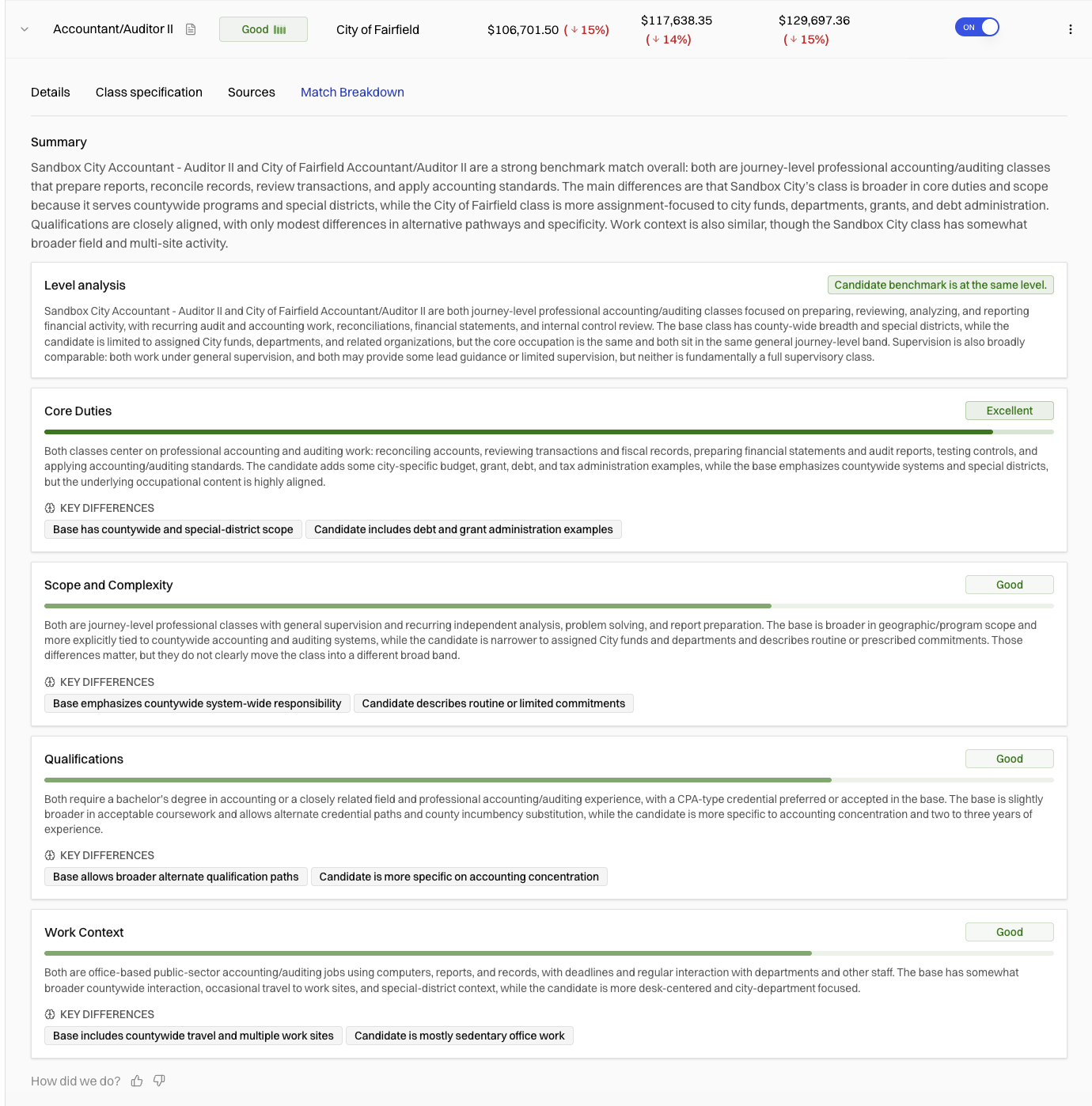
Breakdown categories
Category | Weight | What it measures |
|---|---|---|
Core Duties | 45% | What the role does: its main tasks, purpose, and day-to-day work. |
Scope & Complexity | 30% | How senior and in-depth the work is. Does the role do expert-level or highly technical work? Does it supervise others or oversee projects, or carry out the work directly? This is also where Holly checks whether the two roles are at a comparable level. |
Qualifications | 15% | How closely the minimum requirements line up: education, years of experience, and required licenses or certifications. |
Work Context | 10% | How and where the work is done: field or desk, shift schedules, physical demands, and public-facing work. |
The same categories and weights apply to both internal and market comparisons.
How Holly handles level differences
Holly compares the level of the two roles while it reads them. It looks at language like trainee, assistant, entry, journey, and senior, along with supervisory and decision-making responsibility. If the comparator looks clearly more or less senior than your role, the Scope & Complexity rating drops, even when the duties overlap a lot.
Holly doesn't assign a specific level, like "Level 3," to each role. Levels mean different things at a 50-person district and a 10,000-person county, so Holly asks a simpler question: are these two roles at a comparable level, or is one clearly higher or lower?
Summary and Key Differences
Summary: Holly's overall take on how well this comparator works as a benchmark.
Key Differences: The main ways the two roles differ, which explains why a match isn't 100%. For example: "[Peer jurisdiction]'s role includes countywide auditing responsibilities not found in [your jurisdiction]'s role."
What isn't included in a match
Job title. Titles don't drive the match. Holly looks at what the specifications actually say.
Salary. Salary isn't part of the match, unless the match has no usable job description. In that case, the match will be ranked on job title and salary alone.
Note: Holly's similarity matches are generated with AI to help you find comparable classifications faster. They're a starting point for your analysis, not a final decision. You're still the expert on which comparators make sense for your organization.
Understanding Match Tiers
Match tier | Match percentage | What it means |
|---|---|---|
Excellent | 85–100% | The roles line up very closely in duties, level, qualifications, and work setting. |
Good | 70–84% | Strong alignment with some differences worth reviewing. |
Fair | 55–69% | Partial alignment. Review carefully before using as a benchmark. |
Poor | 40–54% | Limited alignment. Only appears for comparators you've added yourself. |
No Match | Below 40% | The roles have little in common. |
Filtering by match tier
Open the class spec you want to review.
Go to the Market or Internals tab.
Use the Match filter to show only the tiers you want.
Example
Say you're comparing your Budget Manager to a Budget Manager at a peer city, and Holly rates the categories like this:
Category | Rating | Weight | Contribution |
|---|---|---|---|
Core Duties | 0.92 | 45% | 0.414 |
Scope & Complexity | 0.85 | 30% | 0.255 |
Qualifications | 0.80 | 15% | 0.120 |
Work Context | 0.90 | 10% | 0.090 |
Overall | 0.879 |
The overall match is 88%, which puts it in the Excellent tier. If the peer city's role supervised a large division and yours didn't, Scope & Complexity would be lower, and so would the overall match.
Working with Similarity Matches
Re-running matches
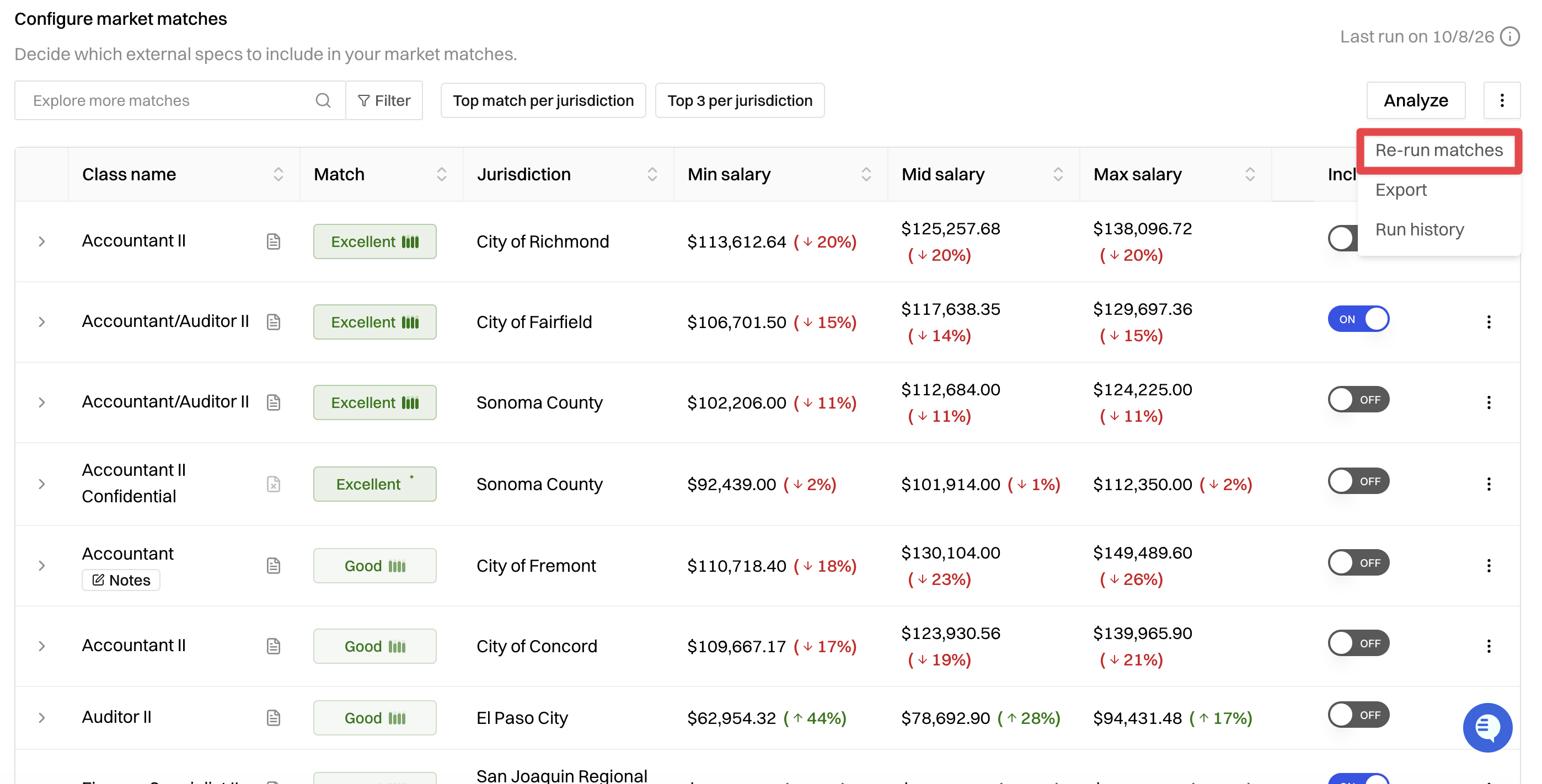
Matches reflect Holly's most recent analysis. To update them, choose Re-run matches from the three-dot menu on a comparator analysis. Comparators you've marked as Include stay in your comparison table after a re-run, even if their tier changes.
Common Questions
Why isn't a role I expected to see showing up as a match?
The two specs share a title but describe different work.
The match came in below 70%, so it wasn't shown automatically.
The comparator doesn't have a processed job description. Holly weighs specification content more heavily than job title. Two roles can share a title but describe very different work, or have different titles but nearly identical duties, so a title match alone isn't a guarantee.
You can always add it yourself to see where it falls.
Why does a lead or supervisor role still match a non-supervisory role?
Core Duties carries the most weight, so two roles doing the same kind of work can still match well. The level difference shows up in Scope & Complexity and in the Key Differences section. Holly's level check is a judgment call, not an exact science, so if a level looks off, use your own judgment and let us know at support@hollygov.com. Your feedback helps us improve it.
Holly says this is a good match, but it doesn't work for us
A Good or Excellent tier means a comparator is worth considering. It doesn't mean it's automatically the right choice. You know things about your organization that Holly can't see, like local labor market conditions or past decisions.
Can I still see match percentages?
Tiers are the default, but some teams are used to percentages or need them for their documentation. If you'd like to see match percentages next to tiers, contact your Holly team and they can turn them on for you.
Questions?
If you have questions about a specific match, or want help explaining your matches to stakeholders, reach out to support@hollygov.com.
Related Articles:
How to Add and Manage Comparator Specs: How to manually add, include, or remove comparators from your analysis
Running Reports for Bulk Analysis: How to run a benchmarking analysis across your entire spec catalog