

Version History and Exports for a Class Spec
See every change made to a class spec, who made it, and when, and export a clean, redlined, or complete audit copy whenever you need one outside Holly.
Holly Keeps a Full History
Holly keeps the complete history of every spec in one place. Every edit is recorded, including changes that were later undone, along with every AI request, approval, and review note. That makes Holly the official record for your specs, and you can pull a copy of that record whenever you need one.
Common Use Cases
Reviewing what AI contributed
Your director wants to know which parts of a revised spec were drafted with AI. Prompt history shows every AI request made on the spec and what Holly produced.
Preparing for an audit
When you need to show how a spec was developed and approved, the audit record export gives you every version, approval, comment, and change in one file.
How to View Versions and Prompt History
Open the class specification and go to the Spec editor tab.
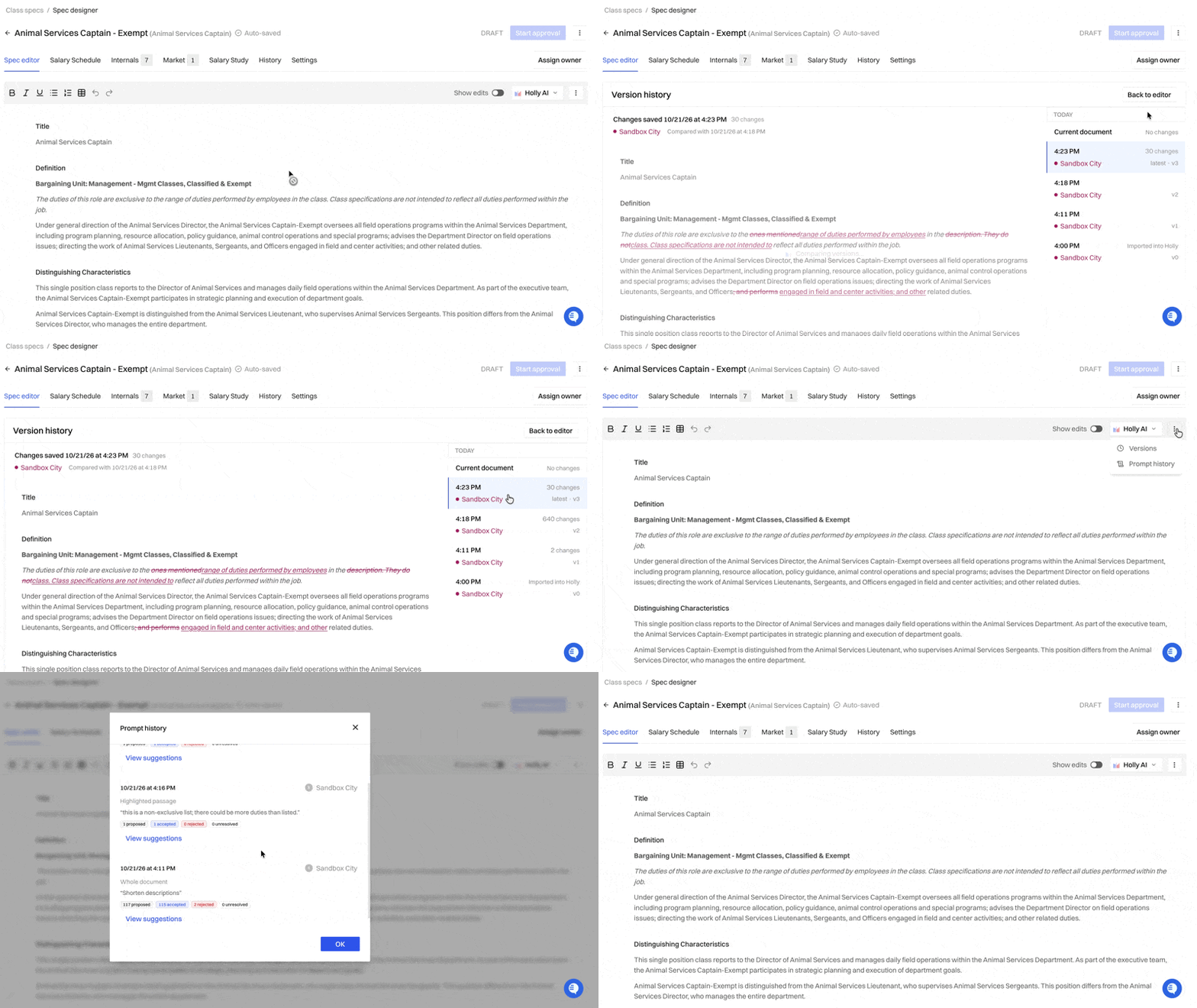
Click the three-dot menu at the top right of the editor.
Select Versions to see the spec's edit history, or Prompt history to see its AI requests.
Click any version to see what the spec looked like at that point.
Understanding Your History
Versions
Versions records every edit over the spec's life, including changes that were later reversed. Each version shows:
Who made the changes
When they were made
How many changes the version included
The oldest entry shows how the spec began:
Created from draft: Started from an existing published spec
Created with AI: Generated with Holly AI
Imported into Holly: Brought in from your existing spec library
Created from merge: Built by combining two or more specs
Prompt history
Prompt history lists every edit made with Holly's AI: the request that was entered and what Holly produced in response.
Workflow
The Workflow tab records each approval and review note from your approval workflow, so you can see who signed off on the spec and what reviewers said along the way.
Exporting a Spec
Exports are for when you need a Word copy. Keep reviews and edits in Holly so the record stays complete.
Open the class specification.
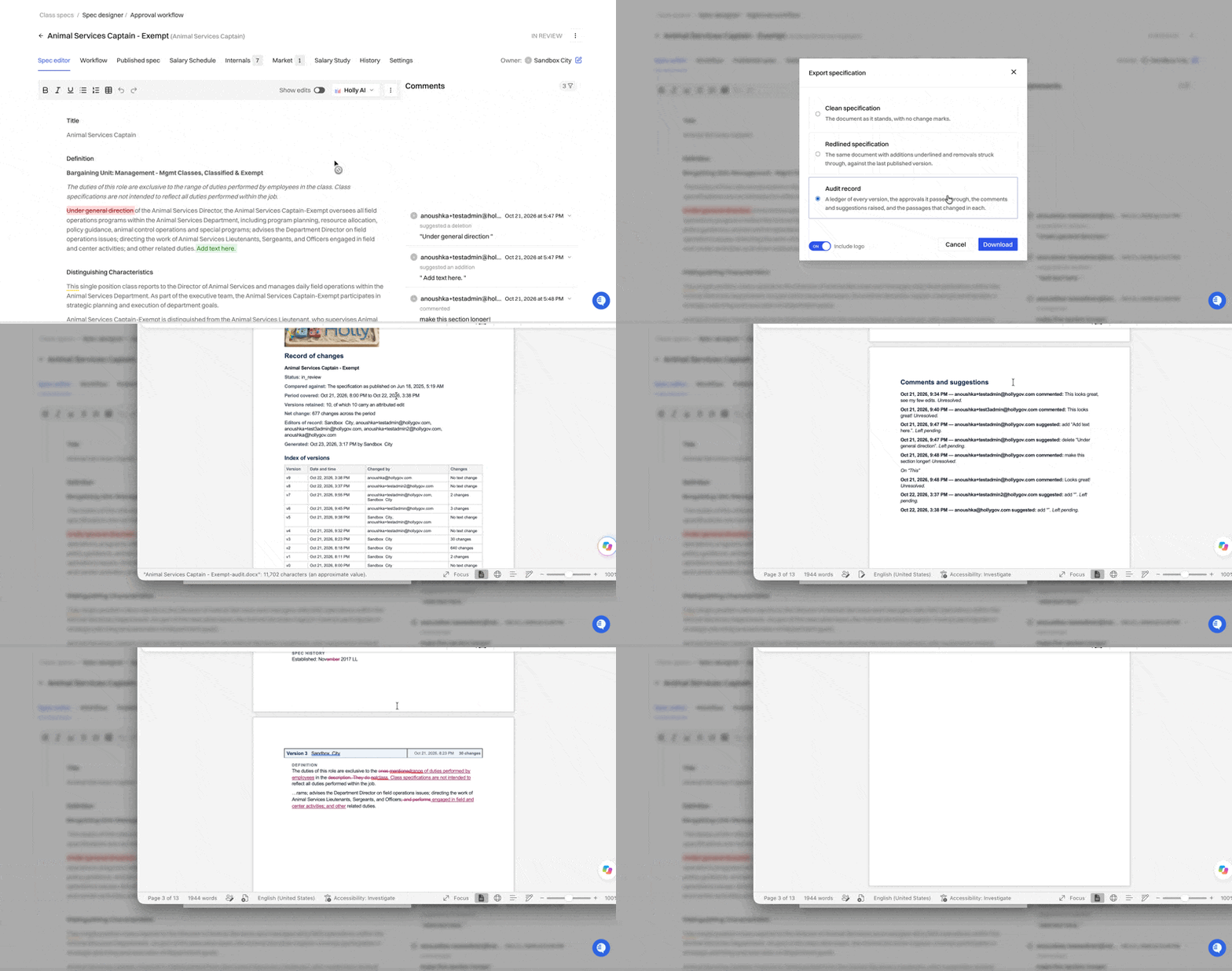
Click the three-dot menu and select the export option.
Choose the type of export you need.
Download the file.
Which export to choose
Export | What's included | Best for |
|---|---|---|
Clean | The current spec with no markup | Posting, recruitment, or sharing the final version |
Redlined | The spec with edits shown | Showing stakeholders exactly what changed |
Audit record | Every version, approval, comment, and change | Audits, grievances, or documenting how a spec was developed |
Is Holly the Official Record?
Yes. Holly keeps the full history of each spec:
Versions records every edit.
Workflow records each approval and review note.
The Audit record export collects every version, approval, comment, and change in one file.
If edits or reviews happen outside Holly, for example in a downloaded Word file, they won't be part of that record. Make changes in Holly so your history stays complete.
Questions?
Reach out to support@hollygov.com.
Related Articles
Editing a Class Specification: Rewrite with AI and Edit Manually: Edit a spec yourself or with Holly AI
The History Tab: View and download earlier published versions of a spec
How Holly's Approval Workflow Works: How reviews and approvals move a spec toward publishing